The Missing Piece of JWT Auth: Implementing Token Invalidation in FastAPI
Learn how to implement JWT token invalidation in FastAPI using Redis for secure logout and real time token revocation in APIs.
12 min read • 5/23/2026
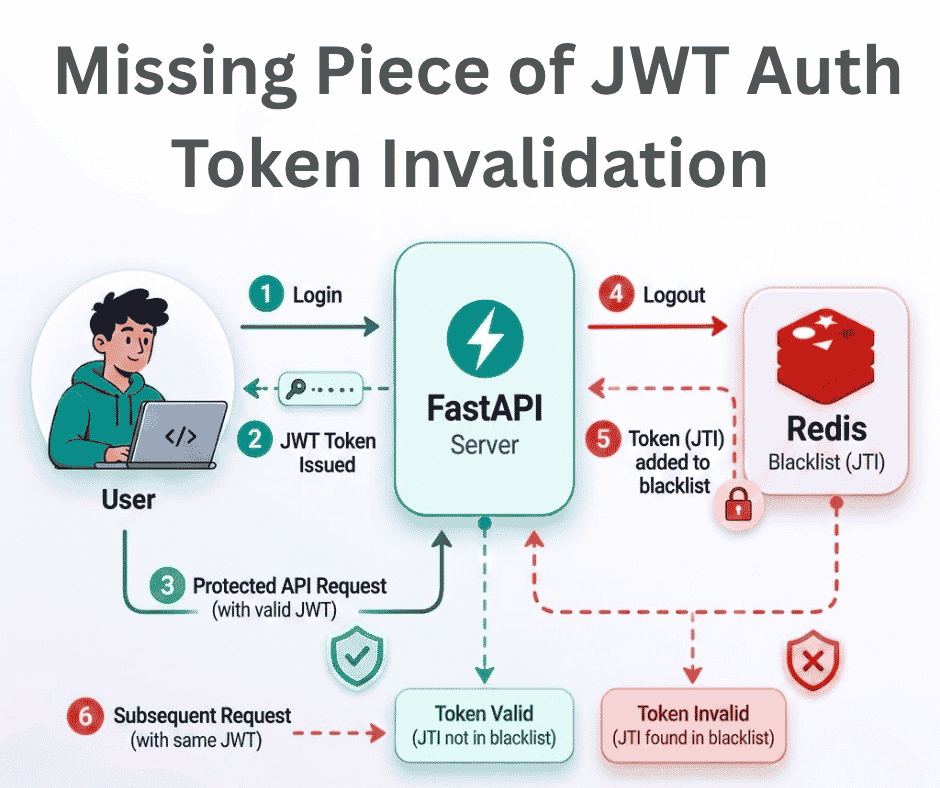
JWT stands for JSON Web Token. It is an open standard that defines a compact and self-contained way to securely transfer data between two or more parties using JSON objects. JWT is widely used in APIs where data needs to be protected with a cryptographic signature.
When we create a JWT Token, it is signed with a secret key and a signing algorithm that helps to ensure the token cannot be modified or tampered with during transmission. This makes JWT a secure method for communication between the server and the client.
One of the biggest advantages of JWT is that it is stateless. The server does not need to store session information because the token itself contains the required authentication data. Anyone holding a valid JWT can access protected resources on behalf of the user who generated it.
JWT tokens are usually configured with an expiration time, which improves security by making the token invalid after a certain period of time. However, token expiration alone does not fully solve security concerns and make it more secure.
The real problem appears when a token is stolen. Even if a user logs out, a stolen JWT can still be used to access protected resources until the token expires. Since JWT is stateless, the server has no built-in way to immediately revoke or invalidate an active token.
In this article, we will implement token invalidation in FastAPI so that a JWT becomes unusable immediately after a user logs out, even if the token has not expired yet.
To achieve this, we will use Redis, a popular in-memory database commonly used for caching. We will store invalidated JWT tokens in Redis for a specific period of time, allowing the server to reject revoked tokens before their expiration time.
Our overall goal is simple: when a user generates a JWT token, the token is assigned an expiration time. If the user logs out before the token expires, we store that token in a caching server until its expiration time is reached.
After logging out, if the same JWT is used again to access protected resources, we check Redis using middleware or another validation mechanism. If the token exists in Redis, we return an unauthorized error because the presence of the token in Redis means the user has already logged out and the token has been invalidated.
If the token does not exist in Redis, the request is forwarded for further processing as usual.
The theory is enough for now. Let’s move to the implementation.
For the Redis server, we will use Docker to keep the setup simple and clean.
First, let’s start a Redis container using Docker. If Docker is not installed on your system, install it first. You can also install Redis directly without Docker if you prefer.
Here is the docker-compose.yml file:
#docker-compose.yml
services:
  redis:
    image: redis:latest
    container_name: redis
    ports:
      - "6379:6379"
    volumes:
      - redis_data:/data
    restart: unless-stopped

volumes:
  redis_data:
Run the following command to start the Redis container:
docker-compose up -d
The -d flag runs the container in the background.
Example output:
pythonfordeveloper@python:~/Desktop/fastapi-jwt-invalidation$ docker --version
Docker version 29.5.2, build 79eb04c
pythonfordeveloper@python:~/Desktop/fastapi-jwt-invalidation$ docker-compose up -d
Creating network "fastapi-jwt-invalidation_default" with the default driver
Pulling redis (redis: latest)...
latest: Pulling from library/redis
02280df0d84b: Pull complete
528dc8790f46: Pull complete
4f4fb700ef54: Pull complete
bbe46012c3a6: Pull complete
fa04bbe9fc8e: Pull complete
5b4d6ff92fc4: Pull complete
19e7049df5a3: Pull complete
911301342bab: Download complete
a2462ae27200: Download complete
Digest: sha256:4d25e2fe601f7ffaeb4437cb6ced3518bc36edf34ebe98863c80836943d94529
Status: Downloaded newer image for redis:latest
Creating redis ... done
pythonfordeveloper@python:~/Desktop/fastapi-jwt-invalidation$ docker ps
CONTAINER ID IMAGE COMMAND CREATED STATUS PORTS NAMES
f5748018bb77 redis:latest "docker-entrypoint.s…" 4 seconds ago Up 3 seconds 0.0.0.0:6379->6379/tcp, [::]:6379->6379/tcp redis
pythonfordeveloper@python:~/Desktop/fastapi-jwt-invalidation$
You can verify whether the container is running or not using:
docker ps
By default, Redis will be accessible on port 6379.
Step-by-Step Implementation
Now, let’s create the FastAPI project. I am going to use UV as the package manager, but you can use any tool you prefer.
Create the project directory, fastapi-jwt-validation, and install the required dependencies:
mkdir fastapi-jwt-invalidation
cd fastapi-jwt-invalidation

uv init
uv add "fastapi[standard]" redis
For simplicity, we are not making the project highly modular right now. We will only create three files for this implementation:
main.pyauth.pyutils.py
The final project structure will look like this (You may also see additional files like readme.md and .venv):
# Folder structure of the Projects

fastapi-jwt-invalidation/
│
├── main.py
├── auth.py
├── utils.py
├── pyproject.toml
└── uv.lock
The auth.py file contains all the authentication related logic, such as token creation, user authentication, token validation, and current user retrieval.
# auth.py

import os
import uuid
from datetime import datetime, timedelta, timezone
from typing import Annotated
from fastapi import Depends, HTTPException, status
from fastapi.security import OAuth2PasswordBearer
import jwt
from pwdlib import PasswordHash
from pydantic import BaseModel
from utils import get_cache

oauth2_scheme = OAuth2PasswordBearer(tokenUrl="/token")
password_hash = PasswordHash.recommended()

# Generate your own value with `openssl rand -hex 32` and set it as an
# environment variable — never hardcode a real secret in source control.
SECRET_KEY = os.getenv("SECRET_KEY")
ALGORITHM = "HS256"
ACCESS_TOKEN_EXPIRE_SECONDS = 30 * 60  # 30 minutes

database_python_for_developer = {
    "pythonfordeveloper": {
        "username": "pythonfordeveloper",
        "full_name": "Python For Developer",
        "email": "[email protected]",
        "hashed_password": password_hash.hash("pythonfordeveloper"),
        "disabled": False,
    }
}

class Token(BaseModel):
    access_token: str
    token_type: str

class TokenData(BaseModel):
    username: str | None = None
    uuid: str | None = None

class User(BaseModel):
    username: str
    email: str | None = None
    full_name: str | None = None
    disabled: bool | None = None

class UserInDB(User):
    hashed_password: str

def verify_password(plain_password, hashed_password):
    return password_hash.verify(plain_password, hashed_password)

def get_password_hash(password):
    return password_hash.hash(password)

def get_user(db, username: str):
    if username in db:
        user_dict = db[username]
        return UserInDB(**user_dict)

async def authenticate_user(username: str, password: str):
    user = get_user(database_python_for_developer, username)
    if not verify_password(password, user.hashed_password):
        return False
    return user

async def create_access_token(data: dict, expires_delta: timedelta | None = None):
    to_encode = data.copy()
    if expires_delta:
        expire = datetime.now(timezone.utc) + expires_delta
    else:
        expire = datetime.now(timezone.utc) + timedelta(
            seconds=ACCESS_TOKEN_EXPIRE_SECONDS
        )
    to_encode.update(
        {"exp": expire, "id": str(uuid.uuid4())}
    )  # Add unique identifier to token for invalidation
    encoded_jwt = jwt.encode(to_encode, SECRET_KEY, algorithm=ALGORITHM)
    return encoded_jwt

async def decode_access_token(token: str):
    try:
        payload = jwt.decode(token, SECRET_KEY, algorithms=[ALGORITHM])
        sub = payload.get("sub")
        if sub is None:
            raise jwt.InvalidTokenError
        username: str = str(sub)
        token_uuid: str = str(payload.get("id"))
        is_blacklisted = await get_cache(f"blacklist:{token_uuid}")
        if is_blacklisted:
            raise jwt.InvalidTokenError
        token_data = TokenData(username=username, uuid=token_uuid)
        return token_data
    except jwt.ExpiredSignatureError:
        raise HTTPException(
            status_code=status.HTTP_401_UNAUTHORIZED, detail="Token has expired"
        )
    except jwt.InvalidTokenError:
        raise HTTPException(
            status_code=status.HTTP_401_UNAUTHORIZED,
            detail="Invalid Access Token",
        )

# Return the Current User based on the Access Token provided in the request header
async def get_current_user(token: Annotated[str, Depends(oauth2_scheme)]):
    credentials_exception = HTTPException(
        status_code=status.HTTP_401_UNAUTHORIZED,
        detail="Could not validate credentials",
        headers={"WWW-Authenticate": "Bearer"},
    )
    try:
        payload = await decode_access_token(token)
        username = payload.username
        if username is None:
            raise credentials_exception
        token_data = TokenData(username=username)
    except jwt.InvalidTokenError:
        raise credentials_exception
    user = get_user(database_python_for_developer, username=token_data.username)
    if user is None:
        raise credentials_exception
    return user
In the auth.py file, we created a temporary in-memory database just for demonstration purposes. In a real-world application, you would connect this authentication system to a proper database.
Similarly, SECRET_KEY is read from an environment variable here, and the other configuration values are hardcoded only to make the demo simple. In a production-grade system, it is strongly recommended to store all of them in environment variables or a secure secret management system.
Inside the create_access_token() function, we are also adding a unique UUID to every token. Instead of storing the entire JWT string in Redis, we only store this UUID, which keeps the cache smaller and more efficient.
The decode_access_token() function contains the core invalidation logic in this demo. Before accepting a token, it checks Redis to verify whether the token UUID already exists in the blacklist Redis cache. If the UUID is found in Redis, the token is considered invalid because the user has already logged out.
For the utils.py file, we have created three helper functions for managing the Redis cache connection and performing cache operations.
# utils.py

redis_cache = None

def set_redis_instance(redis_instance):
    global redis_cache
    redis_cache = redis_instance

async def set_cache(key: str, value: str, expire: int) -> None:
    if redis_cache is None:
        print("Redis cache is not initialized.")
        return
    try:
        await redis_cache.set(key, value, ex=expire)
    except Exception as ex:
        print(f"Error occurred while setting cache for key {key}: {ex}")
        pass


async def get_cache(key: str):
    try:
        if redis_cache is None:
            print("Redis cache is not initialized.")
            return None
        cached_value = await redis_cache.get(key)
        if cached_value:
            return cached_value
        return None
    except Exception as ex:
        print(f"Error occurred while getting cache for key {key}: {ex}")
        return None
One function is responsible for setting the Redis instance globally, while the other two functions are used to store and retrieve key-value data from Redis.
Now, let’s move to the final main.py file.
# main.py

from contextlib import asynccontextmanager
from fastapi.security import OAuth2PasswordRequestForm
from typing_extensions import Annotated
from fastapi import Depends, FastAPI, HTTPException, status
from redis.asyncio import Redis
from auth import (
    ACCESS_TOKEN_EXPIRE_SECONDS,
    Token,
    User,
    authenticate_user,
    create_access_token,
    decode_access_token,
    get_current_user,
    oauth2_scheme,
)
from utils import set_cache, set_redis_instance


@asynccontextmanager
async def lifespan(app: FastAPI):
    # Redis
    try:
        redis = Redis.from_url("redis://localhost:6379/0", decode_responses=True)
        if redis is None:
            raise RuntimeError("Redis instance is None")
        set_redis_instance(redis)
        print("Redis cache initialized successfully")
    except Exception as e:
        print(f"Redis connection failed: {e}")
    yield

    # Cleanup
    if redis and hasattr(app.state, "redis"):
        await app.state.redis.close()


# Create FastAPI app with lifespan
app = FastAPI(
    title="FastAPI JWT Invocation",
    description="""
        FastAPI JWT Invocation by Python For Developer
    """,
    responses={
        status.HTTP_404_NOT_FOUND: {"description": "Not Found"}
    },  # Custom 404 response
    lifespan=lifespan,
)


@app.get("/")
async def root():
    return {
        "message": "FastAPI server is running",
    }


@app.get("/protected")
async def proctected_route(
    current_user: Annotated[User, Depends(get_current_user)],
):
    return {
        "message": f"Hello, {current_user.username}! This is a protected route.",
    }


@app.post("/token")
async def login_for_access_token(
    form_data: Annotated[OAuth2PasswordRequestForm, Depends()],
) -> Token:

    user = await authenticate_user(form_data.username, form_data.password)
    if not user:
        raise HTTPException(
            status_code=status.HTTP_401_UNAUTHORIZED,
            detail="Incorrect username or password",
        )

    access_token = await create_access_token(data={"sub": user.username})
    return Token(access_token=access_token, token_type="bearer")


@app.post("/logout")
async def logout(token: Annotated[str, Depends(oauth2_scheme)]):
    if token:
        try:
            token_data = await decode_access_token(token)
            print(token_data)
            if token_data and token_data.uuid:
                await set_cache(
                    key=f"blacklist:{token_data.uuid}",
                    value="revoked",
                    expire=ACCESS_TOKEN_EXPIRE_SECONDS,
                )
        except Exception as ex:
            print(f"Error: {ex}")
    return {"message": "Logged out successfully"}
Inside the lifespan handler, we create the Redis connection during application startup and make it available throughout the application.
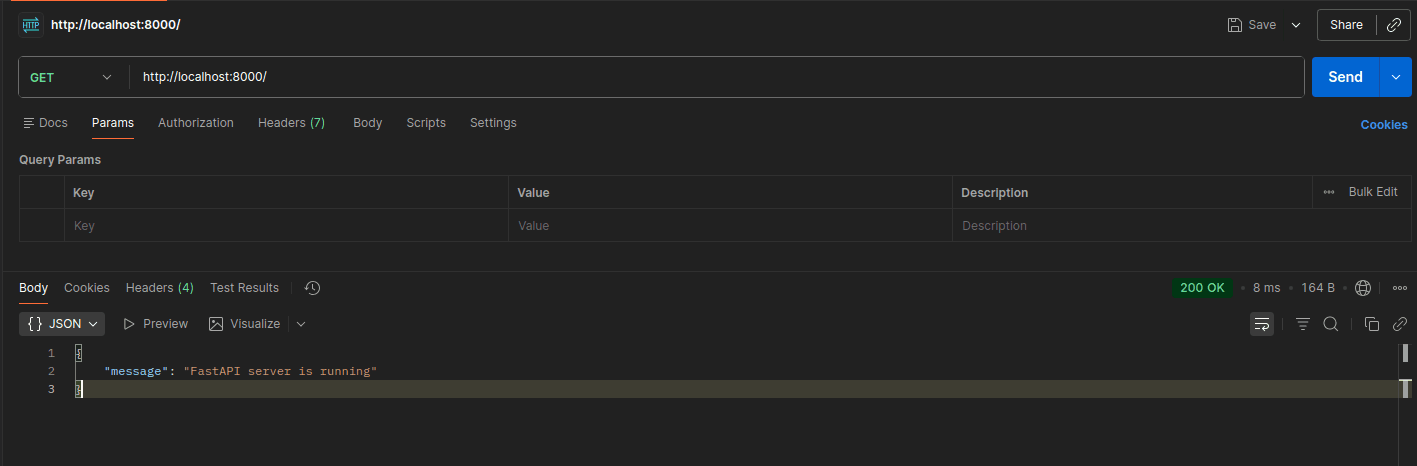
The / route is just a simple health check endpoint to verify that the API server is running properly.
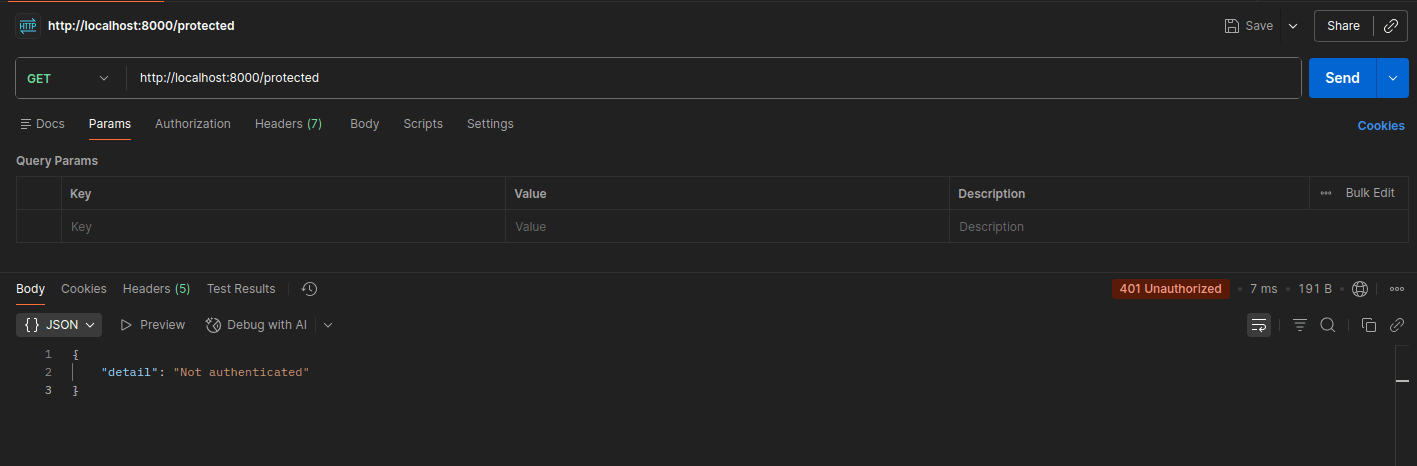
The /protected route is accessible only to users with a valid access token.
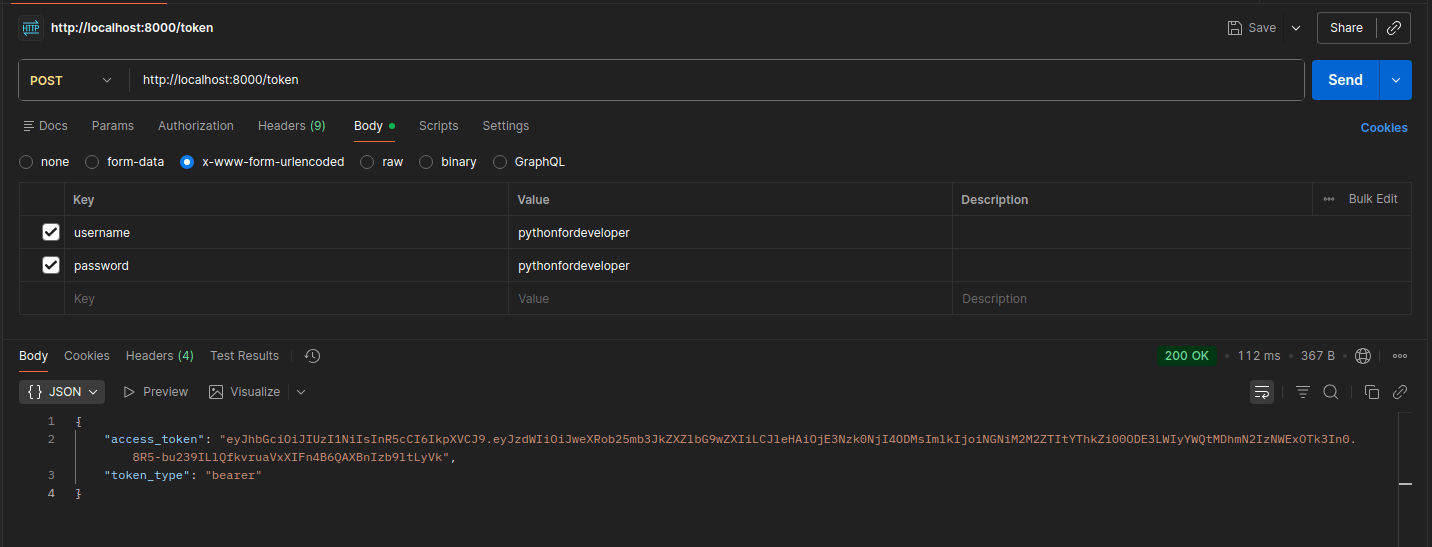
The /token route is used to generate an access token after successful authentication.
The /logout route is responsible for invalidating the token. When a user logs out, we extract the token UUID and store it in Redis. Instead of storing the full JWT token, we only store the UUID because storing long token strings in the cache is unnecessary and less efficient.
Whenever a protected route is accessed, the token validation process checks whether the token UUID exists in Redis. If it exists, the token is treated as revoked, and access is denied.
Testing
Now, let’s run the server and test the implementation using Postman.
First, start the FastAPI development server:
fastapi dev
Example output:
(fastapi-jwt-invalidation) pythonfordeveloper@python:~/Desktop/fastapi-jwt-invalidation$ fastapi dev

FastAPI Starting development server 🚀

             Searching for package file structure from directories with __init__.py files
             Importing from /home/pythonfordeveloper/Desktop/fastapi-jwt-invalidation

    module   🐍 main.py

      code   Importing the FastAPI app object from the module with the following code:

             from main import app

       app   Using import string: main:app

    server   Server started at http://127.0.0.1:8000
    server   Documentation at http://127.0.0.1:8000/docs

       tip   Running in development mode, for production use: fastapi run

             Logs:

      INFO   Will watch for changes in these directories: ['/home/pythonfordeveloper/Desktop/fastapi-jwt-invalidation']
      INFO   Uvicorn running on http://127.0.0.1:8000 (Press CTRL+C to quit)
      INFO   Started reloader process [261591] using WatchFiles
      INFO   Started server process [261655]
      INFO   Waiting for application startup.

Redis cache initialized successfully
INFO Application startup complete.
Once the server starts successfully, you can begin testing the endpoints. For testing, we are going to use Postman, but you can use any API client you prefer.
First Checking Endpoints Without Token Invalidation
Check the Root Endpoint
Send a GET request to:
http://127.0.0.1:8000/Response:
Access the Protected Route Without an Access Token
Now, let’s try accessing the protected route without providing an access token.
Send a GET request to:
http://127.0.0.1:8000/protectedSince this route requires authentication, the server will return an unauthorized response.
Response:
Generating an Access Token
Now, let’s generate an access token using the /token endpoint.
Send a POST request to:
http://127.0.0.1:8000/tokenIn Postman, select x-www-form-urlencoded and provide the following fields:
username:pythonfordeveloperpassword:pythonfordeveloper
Response:
If the provided credentials are correct, you will receive an access token:
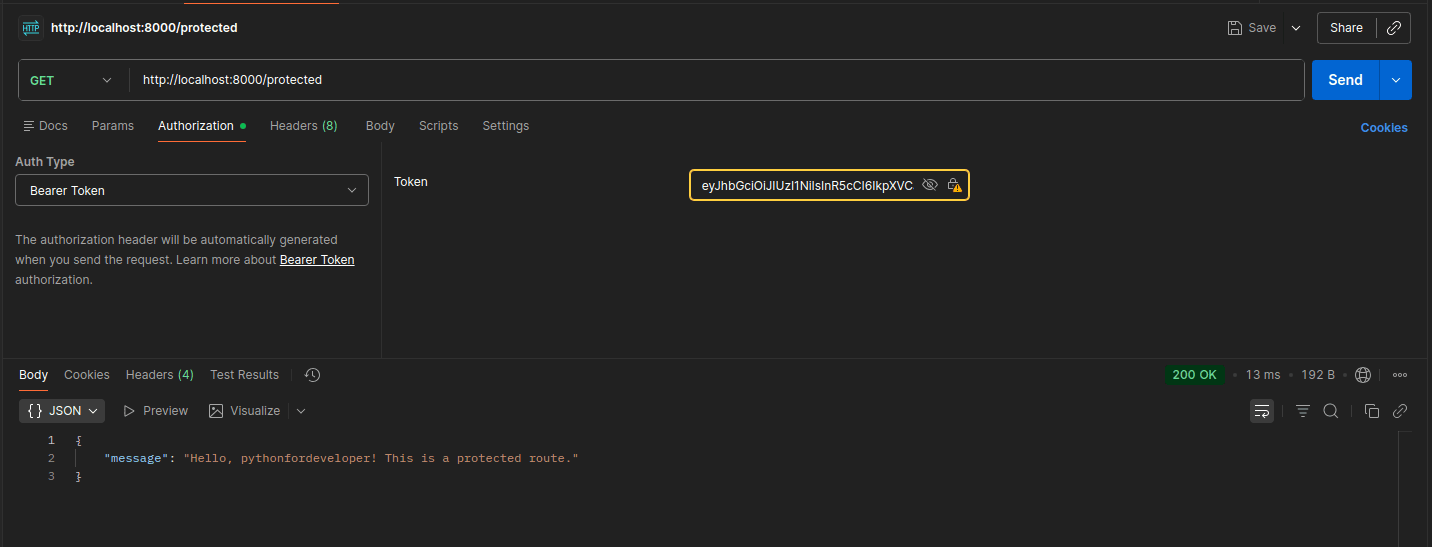
Accessing the Protected Route With an Access Token
Now that we have a valid access token, let’s test the protected endpoint.
Send a GET request to:
http://127.0.0.1:8000/protectedIn Postman, go to the Authorization tab and set:
- Type:
Bearer Token - Token:
<your_access_token>
Response
If the token is valid, you will get a successful response:
Hitting the Logout Endpoint
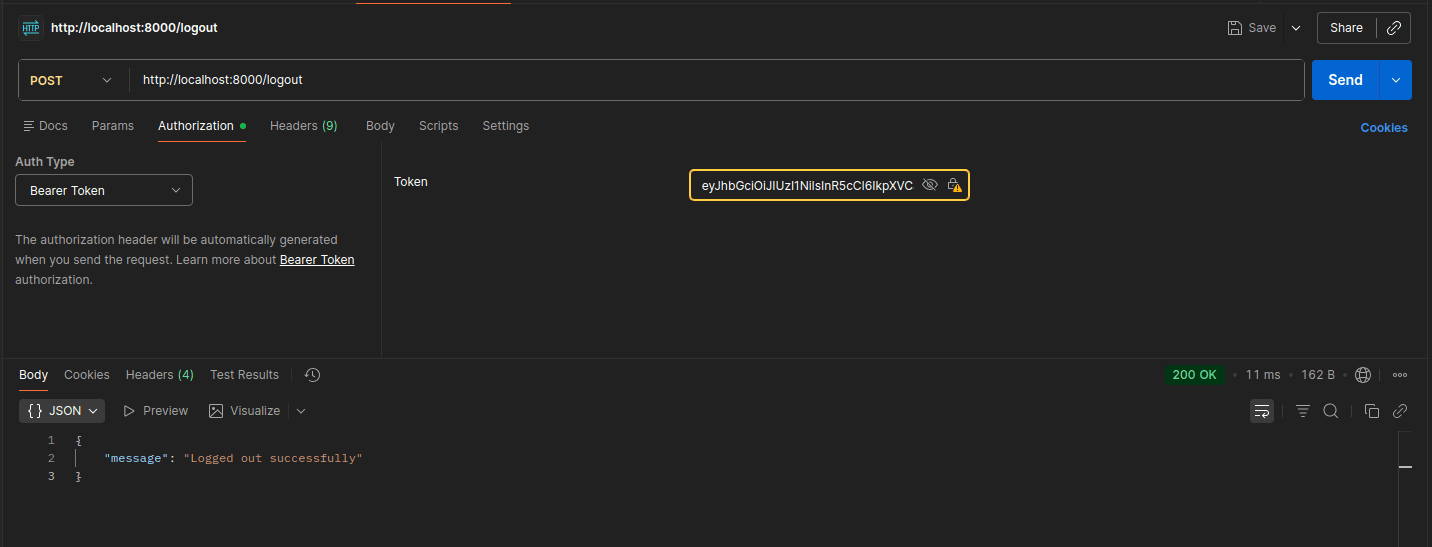
Now let’s test the logout functionality, which is the core part of our token invalidation flow.
Send a POST request to:
http://127.0.0.1:8000/logoutIn Postman, make sure you include the same access token in the Authorization header:
- Type:
Bearer Token - Token:
<your_access_token>
Response
If the request is successful, you will receive:
Accessing With Already Generated Access Token
Now let’s test what happens without relying on token invalidation logic (i.e., before logout-based blacklist enforcement is applied or if the check is bypassed).
Send a GET request to:
http://127.0.0.1:8000/protectedIn Postman, use the same Bearer token in the Authorization header:
- Type:
Bearer Token - Token:
<previously_used_access_token>
Response:
Since the token is still cryptographically valid and not expired, the request will succeed:
Key Point
This is the important observation:
- JWT validation alone only checks:
- signature
- expiration
- It does not care about the logout state.
- So even after logout, logic exists in the system; if the blacklist check is not correctly applied in the auth flow, the token still works.
What this demonstrates
This step highlights the real issue we are solving:
JWT is stateless — so logout does NOT automatically invalidate tokens.
That’s exactly why we introduced Redis-based blacklist checking in decode_access_token().
Now Checking Endpoints with Token Invalidation
Generating Access Token
Send a POST request to:
http://127.0.0.1:8000/tokenIn Postman, provide:
username:pythonfordeveloperpassword:pythonfordeveloper
Response:
Accessing Protected Route
http://127.0.0.1:8000/protectedAdd Authorization:
- Type: Bearer Token
- Token:
<access_token>
Response:
Performing Logout Operation
Send a POST request to:
http://127.0.0.1:8000/logoutUse the same Bearer token in the Authorization header.
Response:
Accessing Protected Route With Previously Generated Access Token
Now try using the same token again after logging out.
Send a GET request to:
http://127.0.0.1:8000/protectedWith the same Bearer token.
Response:
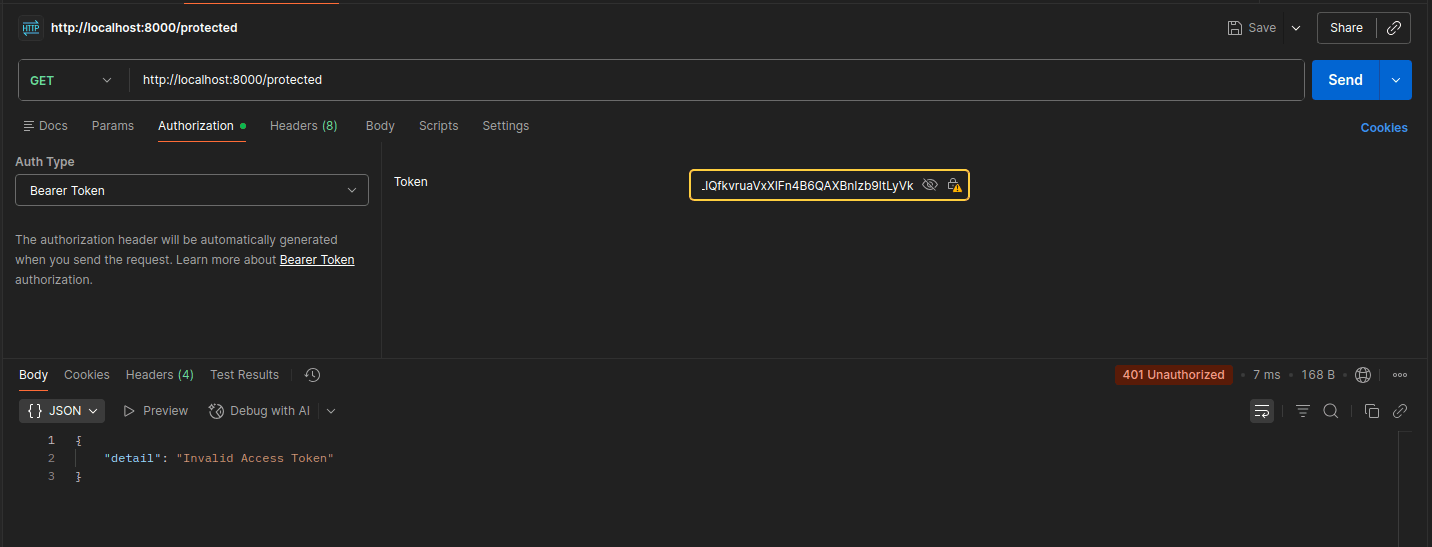
From the testing, we can clearly see that after implementing token invalidation, the token is immediately marked as invalid and cannot be used to access protected resources once the logout operation is performed.
This ensures that the system is no longer purely relying on JWT’s stateless nature for authentication. Instead, it actively checks the blacklist stored in Redis, ensuring that any token revoked during logout is rejected instantly on subsequent requests.
As a result, even if the token has not yet expired, it is no longer accepted by the application after logout, effectively achieving real-time JWT invalidation.
If you’re interested, you can also check the Redis server directly to inspect the stored data and identify which tokens have been invalidated.
Again, for making things clear: we are not storing the full JWT token. Instead, we store the UUID (JTI-like identifier) attached to the token. Since this ID is unique per token, it serves as an efficient reference for revocation of the JWT token.
(fastapi-jwt-invalidation) pythonfordeveloper@python:~/Desktop/fastapi-jwt-invalidation$ docker exec -it redis bash
root@f5748018bb77:/data# redis-cli
127.0.0.1:6379> ping
PONG
127.0.0.1:6379> scan 0
1) "0"
2) 1) "blacklist:4cb3c6e2-a8df-4817-b2ad-08f7b35a1997"
2) "blacklist:dd66e7d9-b521-4a50-a00b-f64ab2494290"
127.0.0.1:6379>
This confirms that invalidated tokens are being tracked properly in Redis.
Best Practices for JWT Token Invalidation
Here are a few important best practices when implementing JWT-based authentication:
- Use JTI (JWT ID) as a unique identifier for each token
- It is a standard JWT claim designed for token identification
- It is more efficient than storing long JWT strings in cache
- Store only the JTI in the database or cache for revocation tracking
- This keeps storage lightweight and fast
- Do not store sensitive information inside JWT
- JWT payload can be decoded easily (it is not encrypted by default)
- Always properly verify JWT signatures
- Avoid using decode-only logic without signature verification
- Ensure that there is a validation of the secret key or the public key.
- Handle Redis failure silently.
- Authentication should not crash if Redis is temporarily unavailable
- Consider fallback strategies or degraded mode behavior
- Prefer HTTP-only cookies over local storage for tokens
- Improves security against XSS attacks
- Keeps token handling server-controlled when possible
Conclusion
JWT is one of the most widely used stateless authentication mechanisms in modern systems. As developers, it is our responsibility to implement it securely and appropriately based on system needs.
Adding token invalidation using a blacklist approach is an important step toward improving security, especially for logout handling and token revocation scenarios.
However, this implementation is still a simplified version. Production-grade systems require additional considerations such as scalability, Redis clustering, failure handling, and stricter security policies.
The key takeaway is simple: JWT is powerful, but only when used thoughtfully and with proper safeguards in place.
Previous
Building and Deploying RustFS: S3 Storage Integration via Docker
Next
Beyond Monoliths: Designing Software with a Plug-and-Play Mindset
You Might Also Like
 Backend & DevOps
Building and Deploying RustFS: S3 Storage Integration via Docker
Amazon Simple Storage Service (S3) is a popular object storage solution designed to help organizations build scalable, highly available, secure, and p
4 min read
 Backend & DevOps
High Performance Self-Hosted Bucket Storage for Developers
At scale, applications don’t store user-uploaded data such as images, videos, or other binary files directly in the database. Instead, this data is ha
6 min read
 Automation & Tools
Best VS Code Extensions for Python Developers
Python is a multi-purpose, high-level, interpreted programming language widely used across many domains. It is used in web development, data analysis,
3 min read