Folder Structure for Django Project
Learn the Folder Structure for Django Project with clear explanations of each file and directory to help you understand how Django organizes your application.
4 min read • 3/20/2026
Django is a popular Python-based full-stack framework that uses an MVT (Model-View-Template) architecture. It is considered one of the most robust and simple frameworks for developers, helping them build clean, efficient, and powerful websites in an optimal amount of time. It’s also used by major companies like Instagram, Google, NASA, and others. Django uses a default but powerful ORM (Object-Relational Mapper) layer that supports multiple databases and simplifies database operations.
If you are new to web development, Django allows you to explore many features such as models, databases, security, routing, and conditional rendering. You can build full-stack applications using this straightforward framework. As you continue learning, you can also explore the Django REST Framework, which is used to develop APIs.
Why Django?
Django is one of the most popular frameworks, and there are many reasons to use it. Here are some points that may help clear your confusion about why Django is a great choice.
- As you know, Django is built using the Python programming language. Python is easy to learn compared to many other languages, although it also has complex topics once you dive deeper. Overall, it is beginner-friendly programming language.
- The Django framework is portable and can be developed and deployed on any platform including Linux, Windows & MacOS.
- It is open-source and has strong community support, which is helpful whenever you encounter a problem.
- Django also comes with a built-in admin user interface that helps in building applications quickly and safely.
- It provides high-level security along with faster development and delivery. Django includes protections against security threats like XSS, clickjacking, SQL injection, and many more.
- It has a built-in ORM that supports a wide range of databases.
- Another great thing about this framework is its easy-to-understand documentation. Every developer relies on documentation, and Django offers clean and well-organized resources to guide you.
Let’s move towards the folder structure for a Django project. When you create a project using the following command, Django generates a default folder structure:
django-admin startproject <myproject>
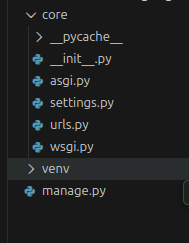
By default, Django creates one main folder with your project name. This folder includes all the settings related to the project, the web server configuration, and the routing system.
The manage.py file is responsible for tasks like running migrations, starting the development server, creating and managing users, and other common commands.
The ASGI and WSGI files are used for deploying the application, depending on the server type.
The settings.py file contains configurations such as middleware, installed apps, database settings, and many other important project settings.
The urls.py file is responsible for routing. All the URL paths for your application are defined here.
Overall, the default structure includes one folder with the project name and a manage.py file.
Let’s create an app using the following command, and also create other necessary folders:
python manage.py startapp <app_name>
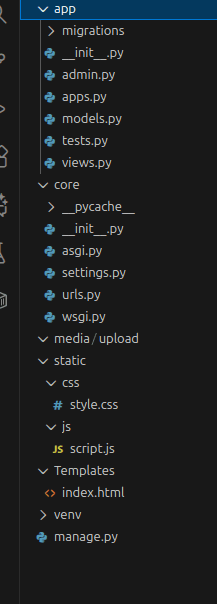
This still isn’t a production-ready application, but it includes all the essential folders and files. The app folder is created when you run the above given command. This is where we write most of the code related to that specific app. For example, if your app is for an authentication system, you would write the login, logout, signup, and other related logic inside this folder.
If you explore the app folder, you will see the __init__.py file, which is empty and simply marks the directory as a module.
The admin.py file is used to register all created tables so they appear in the Django admin dashboard.
The apps.py file contains app-related configurations used internally by Django.
The models.py file is where we define the tables for this specific app. For example, in an auth system, you may define a user table or a user information table and add the required fields.
The tests.py file is where test cases are written.
The views.py file contains functions or classes tied to the routing system. These functions handle logic and render responses.
If you want a separate urls.py file for each app, you can create it and connect it to the core urls.py by including the app-level routes as needed.
Normally, we may also create additional files such as utils.py or services.py, depending on the requirements. But most of the main code is typically written in models.py, views.py, and urls.py.
The media folder is used to store user-uploaded files. However, in real-world scenarios, we usually avoid storing uploaded files directly on the server because it can lead to storage issues and reduced performance. Instead, we use external storage services like S3, R2, MinIO, or similar bucket systems.
The static folder holds static files such as images, JavaScript files, and CSS. These files do not change frequently. In complex systems, CDNs are commonly used to serve static files so the server doesn’t need to handle additional load.
The templates folder contains the HTML files that are rendered by Django’s template engine. These HTML files are called in the views.py of the app. When a route triggers a function in views.py, that function renders the corresponding HTML template from this folder.
Conclusion
Django offers a simple and well-organized folder structure that’s easy to understand, even at a glance. Each file and directory has a clear purpose, making the development process smoother and more predictable. With its powerful features, strong community support, and clean architecture, Django provides everything you need to build reliable and scalable applications. Once you get familiar with the structure, working with Django becomes not just easier but genuinely enjoyable.
You Might Also Like
 Design & Architecture
Building a Pluggable Application with FastAPI and React
Some applications need a different architectural approach from the traditional way of building web systems. One useful option is pluggable architectur
11 min read
 Design & Architecture
Beyond Monoliths: Designing Software with a Plug-and-Play Mindset
In the early days of software development, most companies and developers used monolithic architecture to build systems. It is a traditional approach t
5 min read
 Best Practices
The Missing Piece of JWT Auth: Implementing Token Invalidation in FastAPI
JWT stands for JSON Web Token. It is an open standard that defines a compact and self-contained way to securely transfer data between two or more part
12 min read