How to add Custom Middleware in Django?
Learn to implement custom middleware in Django to handle requests, improve performance, enhance security, and add advanced features to your web apps.
3 min read • 3/19/2026
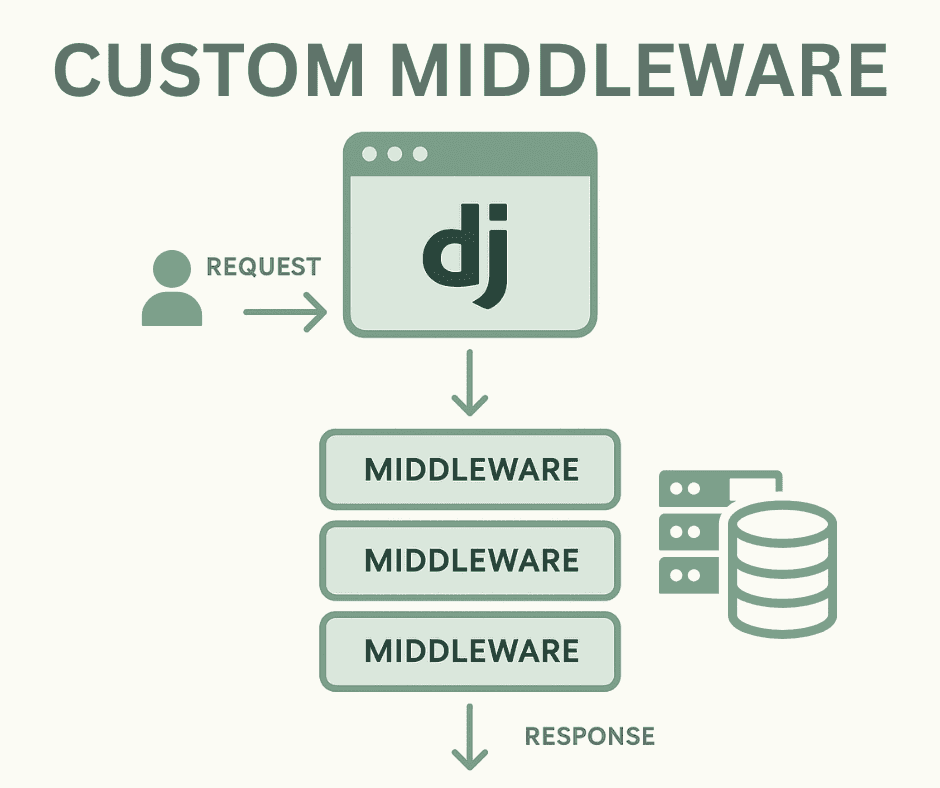
Django is a popular Python-based framework primarily used for building full-stack web applications. While developing an application, there are often cases where we need to perform certain operations on every user request before it reaches a specific view. To handle such cases, Django introduces the concept of middleware.
Middleware is essentially a component, simple or complex, that executes for every HTTP request before it is passed to the targeted view. It can also process the response after the view has been executed, allowing developers to modify both requests and responses globally.
In this article, we will explore how to add custom middleware in Django. Custom middleware allows developers to execute their own logic before and after each HTTP request, following the clean code concept, and helps to extend the functionality of the views.
Why Write Custom Middleware in Django?
- Reduce Code Repetition: Middleware helps avoid repeating the same logic across multiple views or routes.
- Consistent Behavior: It ensures consistent behavior across all parts of the application.
- Request Filtering: Middleware can intercept and block unnecessary or invalid requests before they reach the requested view.
- Advanced Logic Implementation: It enables the implementation of advanced operations such as logging, authentication, or performance monitoring.
How does Middleware Work?
In simple terms, middleware is a function that executes in a specific order in Django. When a user sends a request to a view, the request is first intercepted by the middleware. If everything is valid, the request is forwarded to the URL resolver and views; otherwise, an error can be returned.
After the views process the request and generate a response, the response again passes through the middleware before being sent back to the client.
For example, if there are two middleware functions, X and Y, and a user sends a request to the /home URL:
- The request is first intercepted by X, then by Y.
- The view executes and generates the response.
- On its way back, the response is intercepted first by Y, then X.
In short, middleware handles requests in the order they are added and processes responses in reverse order.
Creating Custom Middleware
You can create your own custom middleware, such as middleware/custom_middleware.py, and import it into the MIDDLEWARE section of the settings.py file. This approach improves code structure and maintainability.
# middleware/custom_middleware.py

class CustomMiddleware:
    def __init__(self, get_response):
        self.get_response = get_response

    def __call__(self, request):
        print("Custom Middleware: Before view")
        response = self.get_response(request)
        print("Custom Middleware: After view")
        return response
# settings.py

MIDDLEWARE = [
    'django.middleware.security.SecurityMiddleware',
    'django.contrib.sessions.middleware.SessionMiddleware',
    'django.middleware.common.CommonMiddleware',
    'django.middleware.csrf.CsrfViewMiddleware',
    'django.contrib.auth.middleware.AuthenticationMiddleware',
    'django.contrib.messages.middleware.MessageMiddleware',
    'django.middleware.clickjacking.XFrameOptionsMiddleware',

    # My Custom Middleware
    'middleware.custom_middleware.CustomMiddleware',
]
In the above example:
- We have created the Custom middleware that prints messages to the server terminal before request and after processing a view request.
- The
self.get_response(request)method sends the request to the view, retrieves the response, and then returns it to the middleware.
With this setup, every HTTP request to the view passes through this custom middleware.
Implementing a Rate Limiting Middleware
To better understand custom middleware, let’s implement a Rate Limiting Middleware that restricts the number of requests a client can make within a specific time window.
# middleware/rate_limitter.py

import time
from django.http.response import HttpResponse

class RateLimiterMiddleware:
    def __init__(self, get_response):
        self.get_response = get_response
        self.requests = {}

    def __call__(self, request):
        client_ip = request.META.get('REMOTE_ADDR')
        current_time = time.time()

        # Clean up old requests
        self.requests[client_ip] = [
            t for t in self.requests.get(client_ip, []) if current_time - t < 60
        ]

        if len(self.requests[client_ip]) >= 10:
            return HttpResponse("Too Many Requests", status=429)

        self.requests[client_ip].append(current_time)
        response = self.get_response(request)
        return response
# settings.py

MIDDLEWARE = [
    'django.middleware.security.SecurityMiddleware',
    'django.contrib.sessions.middleware.SessionMiddleware',
    'django.middleware.common.CommonMiddleware',
    'django.middleware.csrf.CsrfViewMiddleware',
    'django.contrib.auth.middleware.AuthenticationMiddleware',
    'django.contrib.messages.middleware.MessageMiddleware',
    'django.middleware.clickjacking.XFrameOptionsMiddleware',

    # User Defined Middleware
    'middleware.rate_limitter.RateLimiterMiddleware',
]
Explanation:
RateLimitMiddlewaretracks requests per client IP using a dictionary.- Requests outside the defined
60 secondsare removed to maintain only recent requests. - If a client exceeds
10 requestswithin that 60-second window, a429 Too Many Requestsresponse is returned. - Otherwise, the request is forwarded to the endpoint or next middleware.
This approach ensures that endpoints are protected from abuse while demonstrating the flexibility and power of custom middleware in the Django framework.
Conclusion:
Middleware is a powerful feature for handling complex operations during and after HTTP requests and responses. Creating custom middleware not only extends Django’s functionality but also keeps the codebase clean and maintainable. It can enhance security, enable monitoring systems, and ensure consistent behavior across all views in a Django application.
Previous
How to add Custom Middleware in FastAPI?
Next
Best Python web frameworks for building scalable websites
You Might Also Like
 Design & Architecture
Building a Pluggable Application with FastAPI and React
Some applications need a different architectural approach from the traditional way of building web systems. One useful option is pluggable architectur
11 min read
 Design & Architecture
Beyond Monoliths: Designing Software with a Plug-and-Play Mindset
In the early days of software development, most companies and developers used monolithic architecture to build systems. It is a traditional approach t
5 min read
 Best Practices
The Missing Piece of JWT Auth: Implementing Token Invalidation in FastAPI
JWT stands for JSON Web Token. It is an open standard that defines a compact and self-contained way to securely transfer data between two or more part
12 min read