How to Set Up Swagger UI in Django REST Framework
Set Up Swagger UI in Django REST Framework with this step-by-step guide. Learn to document, test, and manage APIs easily using drf-spectacular.
5 min read • 3/22/2026
Python is one of the most popular programming languages in the world, and many well-known companies rely on it. It’s a versatile, high-level language used to build a wide range of applications—from automation and machine learning to data science, web scraping, and DevOps.
Django, a well-known Python-based full-stack framework, follows the MVT (Model–View–Template) architecture. It’s considered one of the most powerful and developer-friendly frameworks for building clean, efficient, and scalable websites quickly.
In Django, we use Django REST Framework to build APIs. It offers a powerful and flexible toolkit for creating robust APIs. It not only supports Django’s core features but also extends the framework’s capabilities, enabling developers to build REST APIs for applications. As a developer, documenting the APIs you create is essential so that frontend engineers can integrate them smoothly. For this purpose, we commonly use Swagger, one of the most popular documentation tools available today.
Swagger UI is an open-source tool that allows developers to visualize and interact with APIs, which is defined by the OpenAPI Specification. It makes the documentation related stuff simple and user-friendly. It is widely used for documenting and testing RESTful APIs, providing a web interface that allows users to explore available endpoints and understand the required request parameter. It significantly simplifies development as there is no need to maintain lengthy markdown files. With a bit of setup, Swagger UI stays in sync with your development.
Why Use It?
As a developer, it’s important to understand why Swagger UI is worth using. Here are a few key reasons:
- It allows developers to test different API methods through an intuitive UI, while also viewing schemas and parameters in real time.
- Compared to older approaches—where every endpoint had to be tested in tools like Postman—it streamlines both development and testing.
- Integration becomes smoother, as Swagger UI provides detailed information, reducing friction between frontend and backend engineers. Both sides can work more independently, improving overall productivity.
- It enables exporting schemas and API details, which can then be used for automated testing in CI/CD pipelines—making development workflows much more efficient.
How to Implement It?
Now that we understand what Swagger is and why it matters, let’s get started with the implementation. In this guide, we’ll walk through each step—from creating a Django app and API to setting up Swagger UI.
First, create a virtual environment. It’s always a good idea to keep dependencies isolated.
# Linux/macOS
python3 -m venv venv
source venv/bin/activate
# Windows
python -m venv venv
venv\Scripts\activate
Install Django and Django REST Framework:
pip install django djangorestframework
Create the Django project:
django-admin startproject swagger_ui
Add rest_framework to the INSTALLED_APPS in the settings.py file:
# settings.py
# Application definition
INSTALLED_APPS = [
  "django.contrib.admin",
  "django.contrib.auth",
  "django.contrib.contenttypes",
  "django.contrib.sessions",
  "django.contrib.messages",
  "django.contrib.staticfiles",

  # Rest Framework
  "rest_framework",
]
Run migrations:
python3 manage.py makemigrations
python3 manage.py migrate
Now, let’s begin by creating a simple “Hello World” API to test things.
Create a new app:
python3 manage.py startapp api
Add the app to INSTALLED_APPS in settings.py:
# settings.py
INSTALLED_APPS = [
  "django.contrib.admin",
  "django.contrib.auth",
  "django.contrib.contenttypes",
  "django.contrib.sessions",
  "django.contrib.messages",
  "django.contrib.staticfiles",

  # Rest Framework
  "rest_framework",

  # Custom App
  "api",
]
In the api/views.py file, create the API endpoint. Here, we’ll define GET and POST requests using the REST framework’s APIView class:
# api/views.py
from django.shortcuts import render
from rest_framework.response import Response
from rest_framework.views import APIView
from rest_framework import status

# Create your views here.

class HelloWorld(APIView):
  def get(self, request):
      return Response(data={"message": "Hello World as GET Request"}, status=status.HTTP_200_OK)

  def post(self, request):
      return Response(data={"message": "Hello World as POST Request"}, status=status.HTTP_200_OK)
Create a urls.py file in the api app and define endpoints for GET and POST requests. We’ll use helloworld/ as the route:
#api/urls.py
from django.urls import path
from . import views

urlpatterns = [
  path("helloworld/", views.HelloWorld.as_view(), name="hello_world")
]
In the main project, where settings.py is located, update the URL configuration to include the API routes. Here, a prefix of api/ is added, so the final endpoint becomes api/helloworld/
# urls.py
from django.urls import path, include

urlpatterns = [
  # Our Endpoint
  path("api/", include("api.urls")),
]
To return a JSON response by the endpoint in the browser instead of the default browsable UI provided by Django REST Framework, update the settings in settings.py. Add the following at the end of the file:
# settings.py
# REST Framework Settings
REST_FRAMEWORK = {
  "DEFAULT_RENDERER_CLASSES": ("rest_framework.renderers.JSONRenderer",),
}
This ensures that responses are always returned in JSON format.
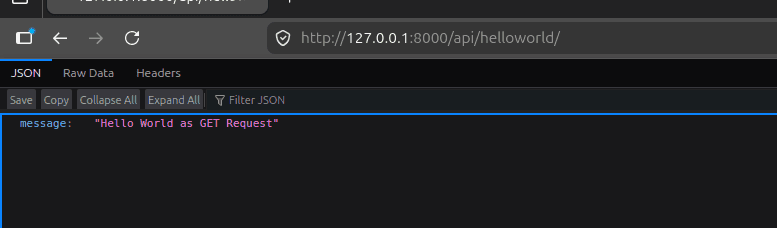
Now, start the server and test the GET request at /api/helloworld/
python3 manage.py runserver
Set up the Swagger UI
For Swagger UI, we’ll use the drf-spectacular package, which generates the OpenAPI schema and serves Swagger UI.
You can learn more about it here: https://github.com/tfranzel/drf-spectacular
Install the package:
pip install drf-spectacular
Update the INSTALLED_APPS in the settings.py file:
# settings.py
# Application definition
INSTALLED_APPS = [
   "django.contrib.admin",
   "django.contrib.auth",
   "django.contrib.contenttypes",
   "django.contrib.sessions",
   "django.contrib.messages",
   "django.contrib.staticfiles",

   # Rest Framework
   "rest_framework",

   # Custom App
   "api",

   # Swagger UI
   "drf_spectacular",
]
In the settings.py file, add the Swagger UI configuration at the end. Also, update the default schema class in the REST framework settings so it can generate the Swagger schema:
# settings.py
# REST Framework Settings
REST_FRAMEWORK = {
   "DEFAULT_RENDERER_CLASSES": ("rest_framework.renderers.JSONRenderer",),
   # Your settings
   "DEFAULT_SCHEMA_CLASS": "drf_spectacular.openapi.AutoSchema",
}

# Swagger UI Config
SPECTACULAR_SETTINGS = {
   "TITLE": "Swagger UI Implementation",
   "DESCRIPTION": "Learning to implement Swagger UI from PythonForDeveloper",
   "VERSION": "1.0.0",
   "SERVE_INCLUDE_SCHEMA": False,
}
You can explore more configuration options here:
https://drf-spectacular.readthedocs.io/en/latest/settings.html
After updating settings.py, we need to create API endpoints to access Swagger UI. We update the main project’s urls.py file, where settings.py is located. Update it as follows:
# urls.py
from django.contrib import admin
from django.urls import path, include

from drf_spectacular.views import (
   SpectacularAPIView,
   SpectacularRedocView,
   SpectacularSwaggerView,
)

urlpatterns = [
   path("schema/", SpectacularAPIView.as_view(), name="schema"),
   # Optional UI:
   path("swagger/", SpectacularSwaggerView.as_view(url_name="schema"), name="swagger-ui"),
   path("swagger/redoc/", SpectacularRedocView.as_view(url_name="schema"), name="redoc"),

   # Our Endpoint
   path("admin/", admin.site.urls),
   path("api/", include("api.urls")),
]
Here, three endpoints are created. You can keep only the ones you need.
To access Swagger UI, visit /swagger/.
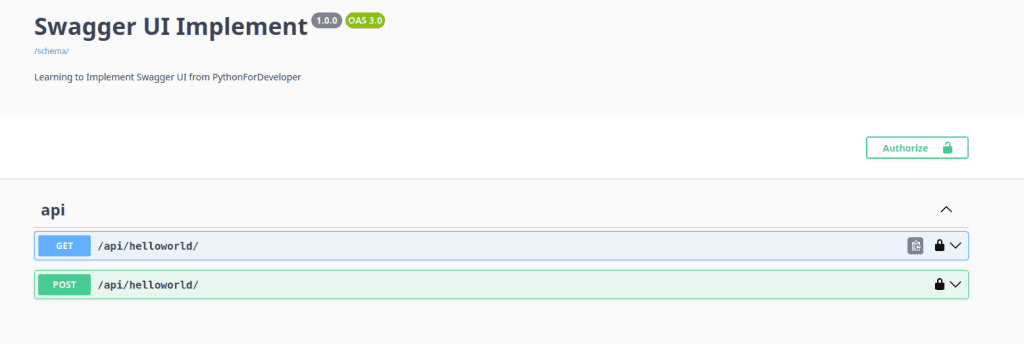
Making GET and POST Requests:

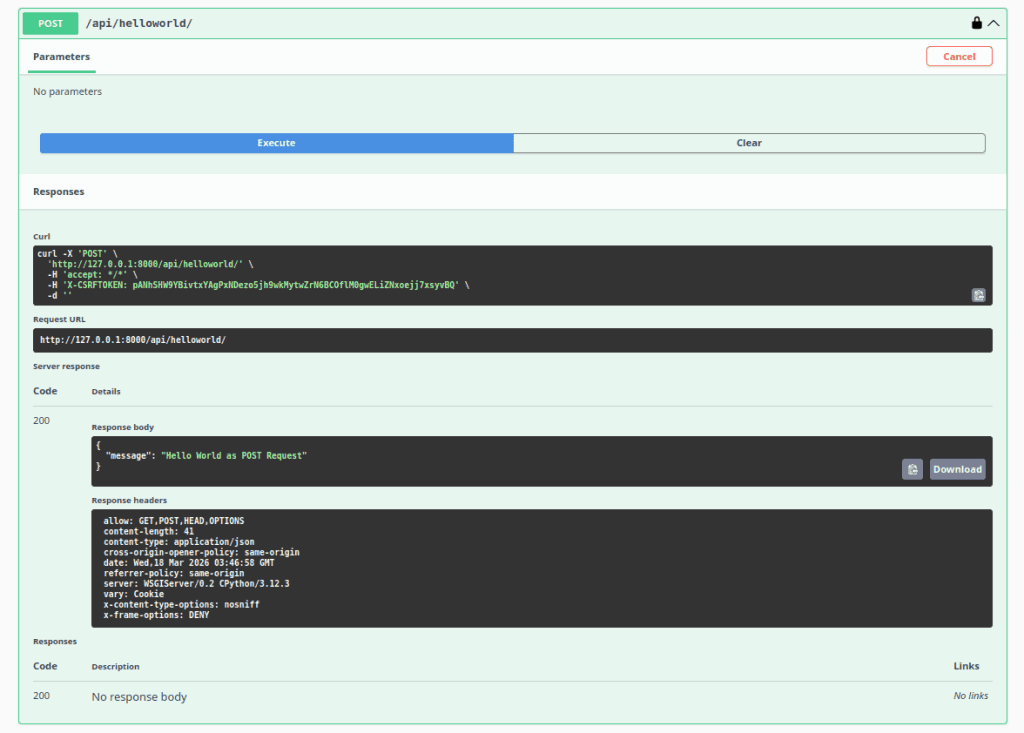
In Swagger UI, you’ll see detailed request and response information for each endpoint, including the request body. This makes testing and integration much easier.
Conclusion
With years of experience working on APIs and backend systems, using Swagger UI for documentation is highly recommended. It simplifies a developer’s workflow and helps improve overall productivity. All the necessary information is available in one place, making it easier for frontend engineers to integrate APIs.
You can explore it further and apply it in real-life projects. Hopefully, from now on, you’ll start implementing it in your APIs.
You Might Also Like
 Design & Architecture
Building a Pluggable Application with FastAPI and React
Some applications need a different architectural approach from the traditional way of building web systems. One useful option is pluggable architectur
11 min read
 Design & Architecture
Beyond Monoliths: Designing Software with a Plug-and-Play Mindset
In the early days of software development, most companies and developers used monolithic architecture to build systems. It is a traditional approach t
5 min read
 Best Practices
The Missing Piece of JWT Auth: Implementing Token Invalidation in FastAPI
JWT stands for JSON Web Token. It is an open standard that defines a compact and self-contained way to securely transfer data between two or more part
12 min read